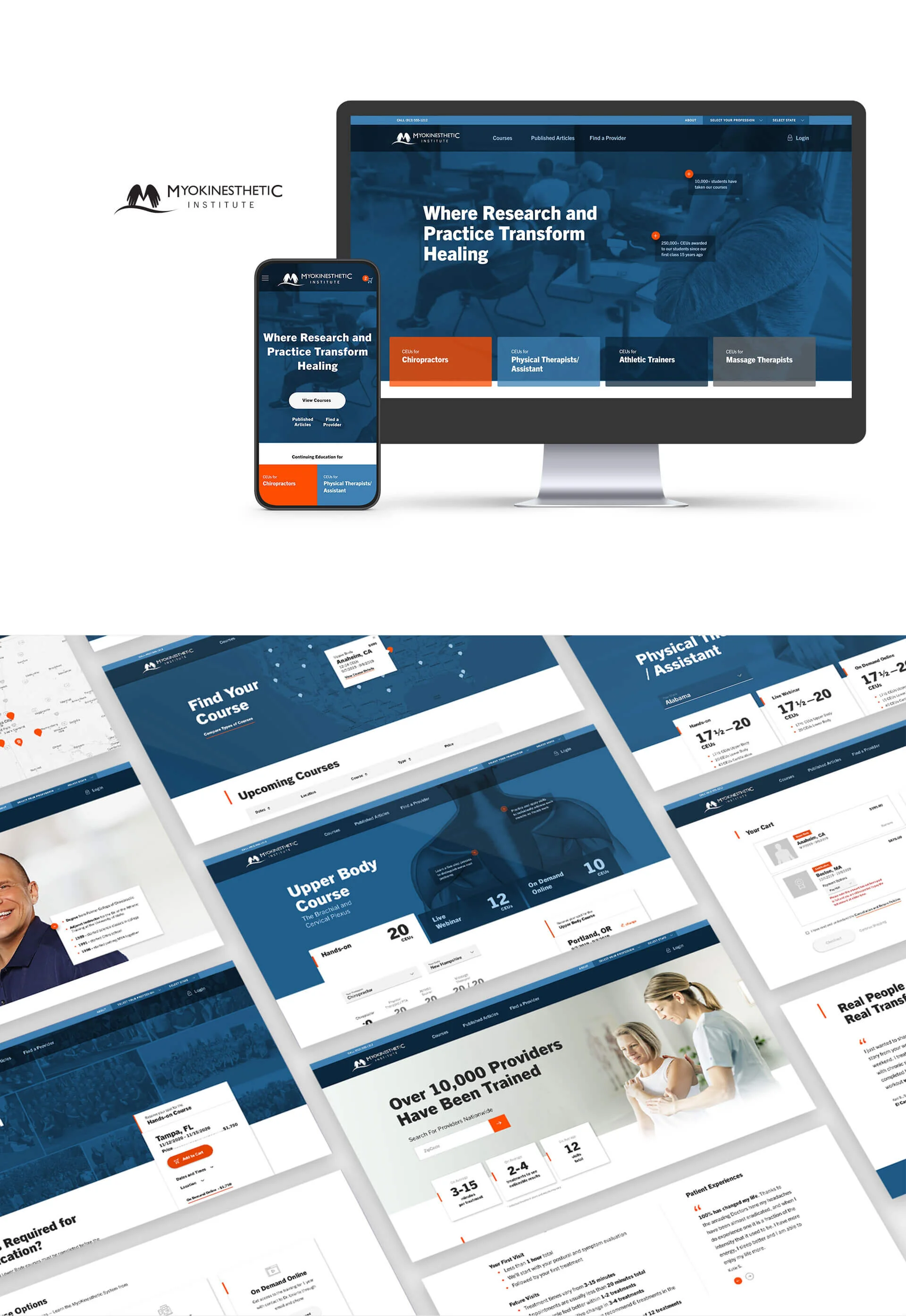
Myokin (Myokinesthetic Institute)
Project overview
Project: Website & learning UX — redesign and launch of Myokin’s site to attract students seeking CEUs and streamline course discovery, enrollment, and content delivery.
Role: Senior UX Designer — led research, IA, interaction design, prototyping, usability testing, content strategy, and handoff.
Timeline: 6–8 weeks (discovery → prototype → test → launch)
Team: Product Owner, Content Strategist, Instructional Designer, Front-end Dev, Marketing, Analytics
Context Myokin provides continuing education (CEU) courses for allied health professionals (physical therapists, massage therapists, chiropractors, athletic trainers). The existing site lacked a clear learning path, discoverability of accredited courses, and persuasive content for new and returning students. Budget and timeline were constrained ($67.5k estimate, launch planned Jan 22–31).
Problem
Prospective students couldn’t easily find which CEU to take, whether it applied to their license/state, or what outcomes they’d achieve.
Site content didn’t speak to multiple audiences (potential students, past students, institutional buyers).
Enrollment funnel was fragmented; key questions (accreditation, cost, delivery format, learning outcomes) were buried.
Marketing and sales needed a clearer lead path and downloadable assets to convert prospects.
Goals & success metrics
Increase qualified course inquiries and enrollments (target +30% within 90 days)
Improve course discoverability and reduce “zero-result” queries by 60%
Raise completion of course decision funnel (view → course detail → enroll) to 50%+
Deliver prioritized UX artifacts for dev and marketing within timeline and budget
Research approach
Stakeholder workshops: align business goals, accreditation constraints, and content requirements with Registrar and instructors.
User interviews: potential students (PTs, MTs, chiropractors, athletic trainers), past students, and institutional buyers — identify decision criteria and barriers.
Content & analytics audit: course catalog, receipts/process flow, existing marketing pages, and any analytics for search/popularity.
User story map & Kanban: prioritized features and launch scope (search/discovery, course pages, enrollment path, receipts/invoice flow).
Key research findings
Primary decision drivers: CEU accreditation (state acceptance), relevance to practice, duration/format (live vs asynchronous), price, and clear learning outcomes.
Question patterns: “Which CEU do I need?” “Is this accredited in my state?” “How long will it take and what will I learn?”
Audience segments: Potential students (need guidance), Past students (seek resources & transcripts), Institutional buyers (bulk purchase/CEU for staff).
Search friction: inconsistent program titles and lack of synonyms caused many 0-result searches.
Trust elements: badges, published articles, clear instructor bios, and short video previews increased intent to enroll.
Design solutions
Search-first course discovery: tolerant search with synonyms, program filters (profession, state accreditation, delivery format, duration), and suggested results.
Clear course detail template: accreditation status by state, learning outcomes, CEU hours, sample content (video clip), instructor bio, price, and FAQ block answering top user questions.
Decision helper: short guided path “Which CEU fits me?”—question flow that routes users to recommended courses.
Enrollment flow: streamlined add-to-cart → checkout with visible receipts, automated CEU certificate delivery, and clear refund/attendance policies.
Audience-specific entry points: home hero + CTAs for Potential Students, Past Students (transcripts/CEU history), and Institutional Buyers (bulk enrollments).
Admin tools & workflows: analytics for search popularity and 0-result queries, receipt and product/transaction sync flows, and Kanban for course content updates.
Content & trust anchors: accreditation badges, published article links, and short outcome-focused copy.
Prototyping & testing
Low- to high-fidelity prototypes for desktop and mobile.
Moderated usability tests with 12 participants across segments focused on search, course selection, accreditation lookup, and enrollment.
Iterations: tightened taxonomy, added state-by-state accreditation display, simplified checkout, and added decision-helper microcopy.
Deliverables
High-fidelity prototypes (Figma) for discovery, course detail, decision helper, and checkout.
User story map, Kanban board, and prioritized backlog for launch.
Course detail templates, enrollment receipt flow, and certificate delivery spec.
Analytics event map (search terms, 0-result events, enrollments, receipts).
Usability test report with prioritized fixes and content recommendations.
Handoff package: component specs, accessibility notes, and dev tickets.
Measured / projected outcomes (launch targets based on research and pilot metrics)
Qualified inquiries/enrollments: +30% within 90 days
Zero-result searches: −60% after synonyms and suggestions implemented
Decision-funnel conversion (view → enroll): target 50%+
Faster support resolution: reduced inquiry handling time due to clearer course pages and FAQs
Learnings & impact
A search-first IA with profession- and state-aware filters is essential for CEU platforms where accreditation is a primary purchase driver.
Short decision-helper flows greatly reduce choice paralysis for busy clinicians.
Visible accreditation and quick previews increase trust and accelerate enrollment.
Instrumenting search and 0-result analytics surfaces ongoing content gaps and informs course naming and marketing.